Un virement déplace de l'argent entre deux de vos propres comptes — déposer les espèces du jour à la banque, approvisionner une caisse depuis le compte principal, transférer des fonds entre agences. L'enregistrer comme un virement, plutôt que comme une dépense d'un côté et un revenu de l'autre, garde les deux soldes justes tout en laissant intacts vos chiffres de revenus et de dépenses : l'argent change simplement de poche, il n'entre ni ne sort de l'entreprise.
Les virements sont généralement effectués par la personne qui rapproche la trésorerie — un propriétaire, un comptable ou un responsable. Comme un virement touche les soldes des comptes, il vous faut la permission bancaire pour en créer, modifier ou supprimer un ; le bouton Nouveau virement n'apparaît qu'aux membres de l'équipe qui la possèdent.
Ce que fait un virement
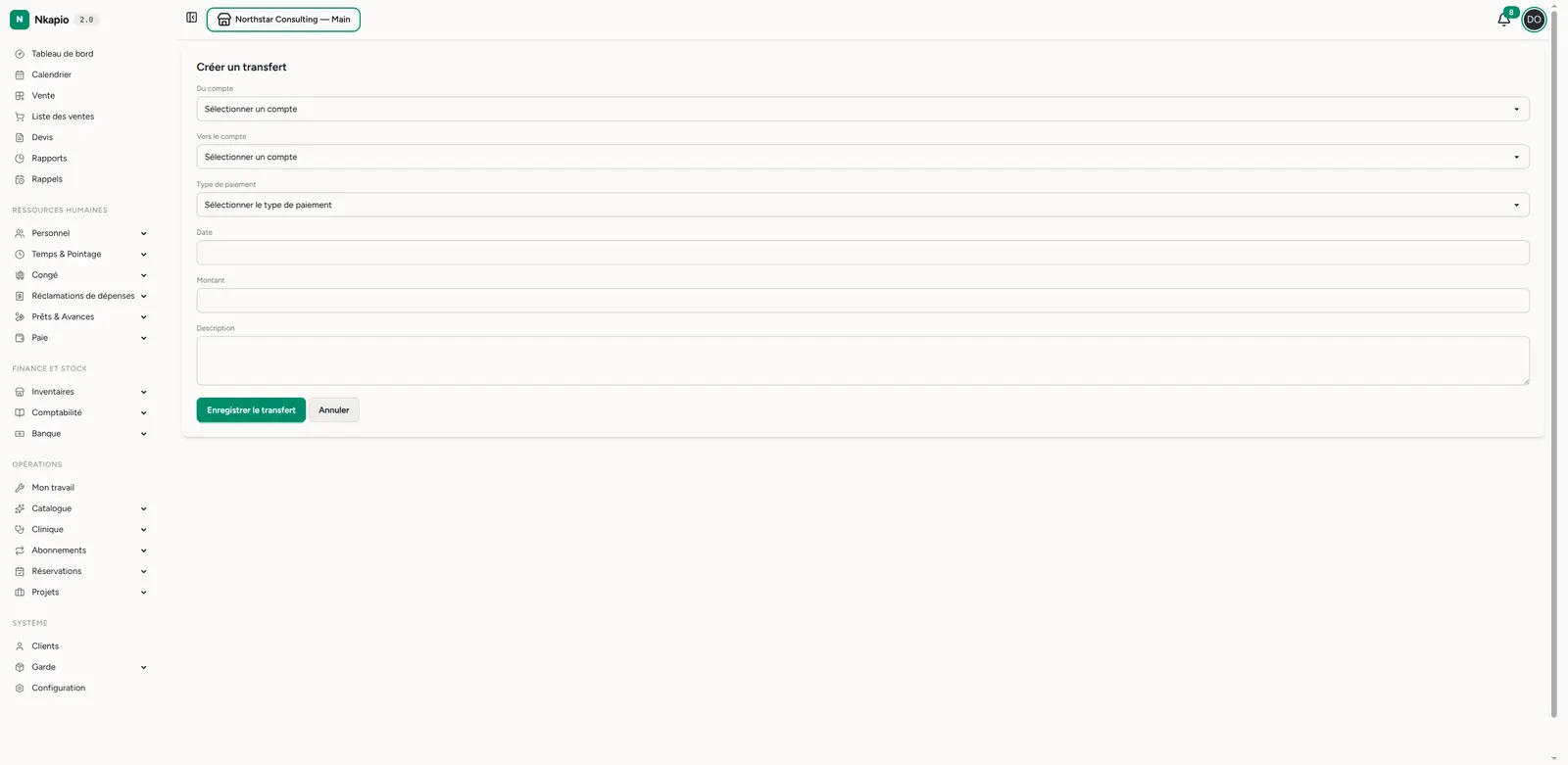
Chaque virement enregistre quatre éléments : un compte source (argent qui sort), un compte destination (argent qui entre), un montant et une date. Vous pouvez ajouter un type de paiement facultatif et une courte description, et Nkapio attribue automatiquement à chaque virement sa propre référence.
À l'enregistrement, Nkapio réalise les deux côtés du mouvement en une seule étape : il diminue le solde source du montant et augmente le solde destination du même montant, puis passe une paire d'écritures équilibrées dans le grand livre comptable en tant que virement interne. Les deux comptes restent alignés, et le virement n'apparaît jamais comme un revenu ni comme une dépense dans vos rapports.
La liste des virements
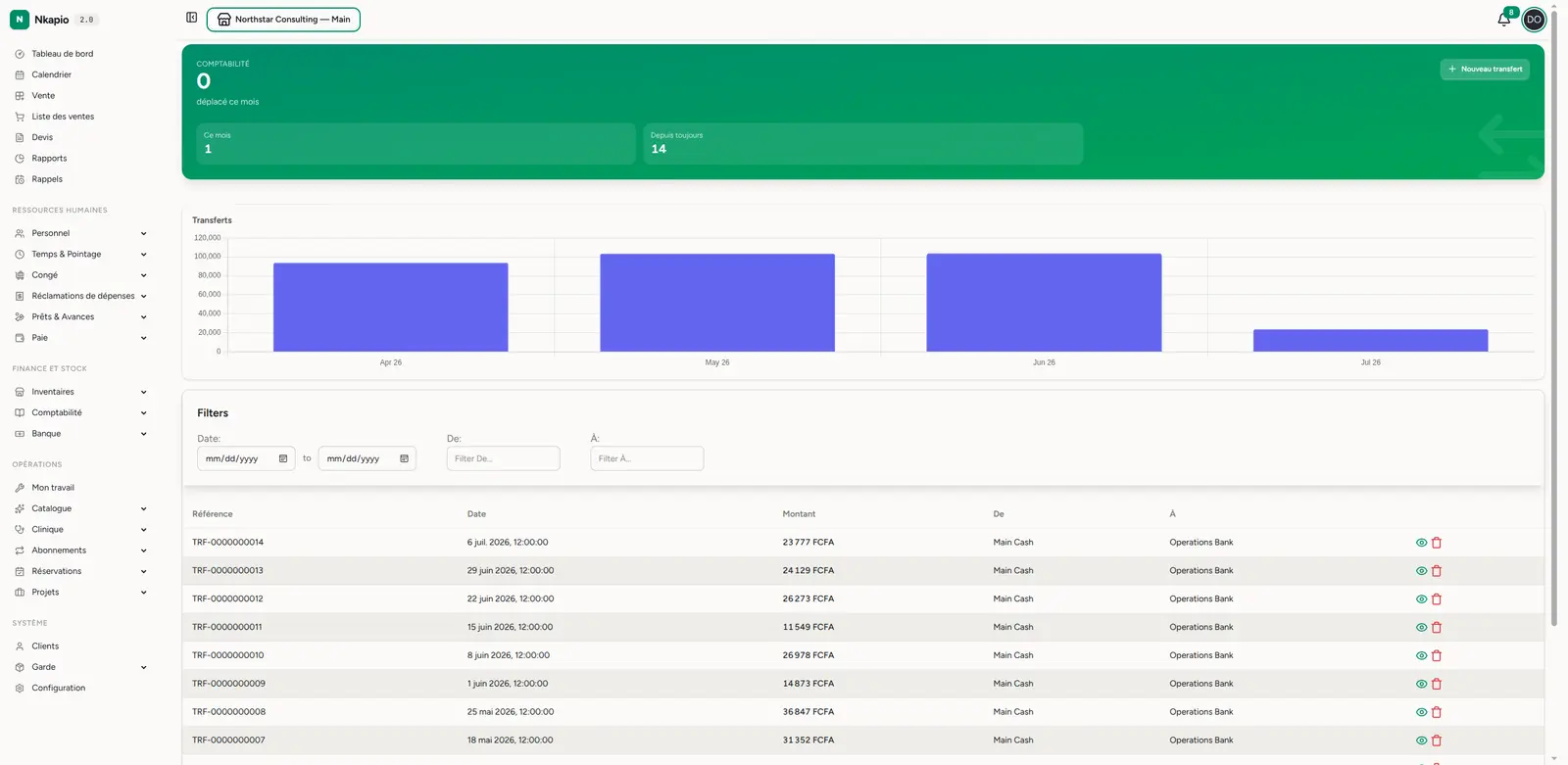
Ouvrez Banque → Virements (/banking/transfers). Un bandeau récapitulatif
indique combien vous avez déplacé ce mois-ci, avec le nombre de virements du
mois et depuis toujours. En dessous, un graphique virements dans le temps
trace votre volume de mouvements, et le tableau liste chaque virement avec sa
référence, sa date, son montant et les comptes source et
destination. Triez par date ou par montant, et filtrez par date ou par l'un
des comptes pour en retrouver un précis.
Enregistrer un virement
Cliquez sur Nouveau virement et choisissez le compte source et le compte destination, saisissez le montant et la date (vous pouvez aussi préciser une heure), et sélectionnez un type de paiement. Ajoutez une description si elle aide — une courte note comme « dépôt d'espèces du soir » rend le relevé lisible des mois plus tard. Cliquez sur Enregistrer le virement et Nkapio débite la source et crédite la destination en un seul mouvement équilibré.
Deux règles gardent l'écriture propre :
- Les deux comptes doivent être différents. On ne peut pas virer un compte vers lui-même ; Nkapio vous demandera de choisir une autre destination.
- Le montant doit être positif. Saisissez la valeur qui quitte la source ; l'augmentation correspondante sur la destination est prise en charge pour vous.
Modifier ou supprimer un virement
Ouvrez un virement depuis la liste pour voir tout son détail — le montant, les comptes source → destination, la date, sa référence et la description. De là, vous pouvez Modifier le virement pour corriger les comptes, le montant ou la date ; Nkapio annule le mouvement d'origine et applique le nouveau afin que les deux soldes tombent au bon endroit. Supprimer un virement depuis la liste recrédite la source et retire le montant de la destination, annulant entièrement le mouvement.
Astuces
- Utilisez un virement, pas une dépense + un revenu — les virements gardent vos chiffres de revenus et de dépenses propres ; deux écritures séparées compteraient le même argent en double.
- Versez les espèces chaque jour — enregistrer un versement caisse-vers-banque chaque jour garde le solde de caisse réaliste et le compte bancaire à jour.
- Gardez les deux comptes dans la même devise — un virement déplace le montant identique vers la destination ; il est donc destiné à des comptes qui détiennent la même devise.
- Indiquez le motif — une courte description transforme un simple chiffre du relevé en quelque chose que vous reconnaîtrez plus tard.
Questions fréquentes
- Un virement compte-t-il comme un revenu ou une dépense ? Non. C'est un mouvement interne entre vos propres comptes ; il n'affecte donc jamais vos totaux de revenus ou de dépenses.
- Puis-je déplacer de l'argent entre agences ? Oui — tant que les deux comptes d'agence existent, un virement entre eux fonctionne comme n'importe quel autre.
- Et si je me suis trompé de compte ? Modifiez le virement ; Nkapio défait l'ancien mouvement et réapplique le mouvement corrigé afin qu'aucun solde ne reste faussé.